
About Simba drivers


Connect data tools with ODBC & JDBC drivers
Use production-grade drivers to query live SaaS, NoSQL, big data, ERP, and application data from the tools your teams already use.
The problem
Tools need real connections
Business data sits in SaaS, ERP, NoSQL, cloud, and big data sources tools do not support well. When the connection is missing, work stalls before analysis.

Reach the data
Teams rarely choose where data lives: SaaS, ERP, NoSQL, cloud, big data, or custom sources a tool does not support well. When the connection is missing or unreliable, work stalls before analysis starts. The first problem is a trusted connection.

Keep data in place
Moving data into another pipeline or copy adds latency, cost, governance questions, and another system to maintain. Many teams just need existing tools to query live data through standards they know. Skip data movement when a driver can do the job.

Survive production
A connection that works once in test can fail under real usage: changing APIs, metadata quirks, authentication, and large queries. Production connectivity needs more than a thin connector. It has to hold up when the business relies on it.
How it works
Connect the tools teams already use
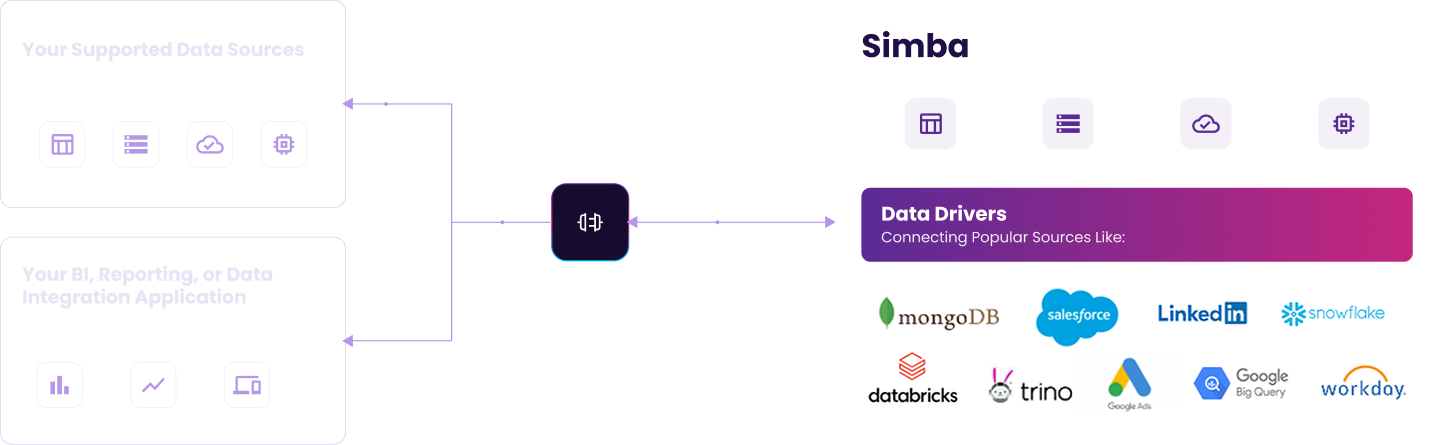
Simba Data Connectivity gives teams standards-based ODBC and JDBC access to live data across analytics, BI, ETL, reporting, and application workflows. Connect existing tools through production-ready drivers built for the source you need.

ODBC and JDBC drivers
Connect analytics, BI, ETL, reporting, and custom app workflows through standards your tools already support.

Live Data Access
Query source data in place without creating a separate copy just to make it available to a tool.

Source-Specific Depth
Use drivers built around the behavior, metadata, authentication, and query patterns of each source.
Production-Ready
Support enterprise workloads where reliability, refresh behavior, authentication, and performance matter.

Tool-Ready Integration
Give teams a consistent way to connect the applications they use to the sources they need.

Driver Catalog
Start with the driver catalog to find the ODBC or JDBC connection path for your source.
WHY US
Built for the tools you trust
Use the ODBC and JDBC standards your tools already speak, avoid extra pipeline copies, and find the right driver fast through the catalog.
Standards-Based Access
Less Pipeline Sprawl
Find the Right Driver Faster
How will you connect the data?
| Feature | Export & Reimport | Custom API Code | ETL Pipeline | Simba Driver |
|---|---|---|---|---|
| Query live data in place | ||||
| No extra copy to maintain | ||||
| Works with existing tools | ||||
| Source metadata and auth | ||||
| Keeps working as sources change | ||||
| Fast path to a known source | ||||
| Transform or reshape data | ||||
| Combine many sources |

