
How To Reconcile OANDA FX Currency Rates To Your ERP

insightsoftware est le fournisseur le plus complet de solutions destinées au service du directeur financier. Nous transformons les informations en connaissances, permettant ainsi aux dirigeants d'entreprise de piloter leur organisation de manière stratégique.

Many companies choose OANDA as the source for FX rates as they are a reliable, well-trusted rates provider. They publish Market Rates for every tradeable currency. There is a large amount of information available on OANDA’S website: https://www1.oanda.com/fx-for-business/historical-rates. Therefore, if you are checking rates, be sure to look at the correct data. This blog highlights two of the biggest pitfalls to be aware of when you are checking rates on the OANDA website.
1. Check the Price Type
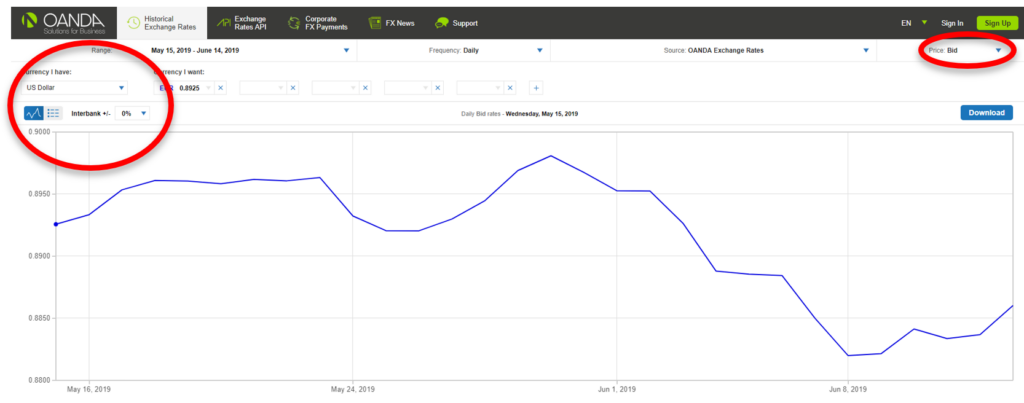
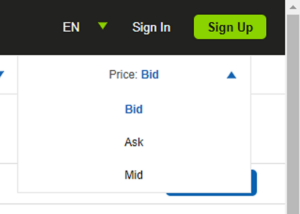
The rates page defaults to showing ‘Bid’ rates (sometimes known as ‘Buy’). The other Price types are ‘Mid’ and ‘Ask’ (sometimes known as ‘Sell’). Make sure you have selected the correct option before cross-checking rates against those loaded in your ERP or spreadsheet, as these may be Mid or Ask rates rather than Bid. The Price type can be changed in the drop-down menu in the top right of the screen:
2. Beware of Date Offsets When Checking Averages
OANDA provide a Period Average rate on their website, which can be found by choosing to show rates in table form rather than on a graph:
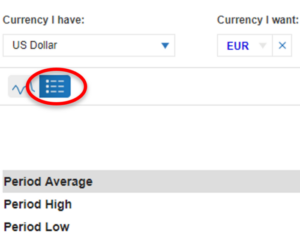
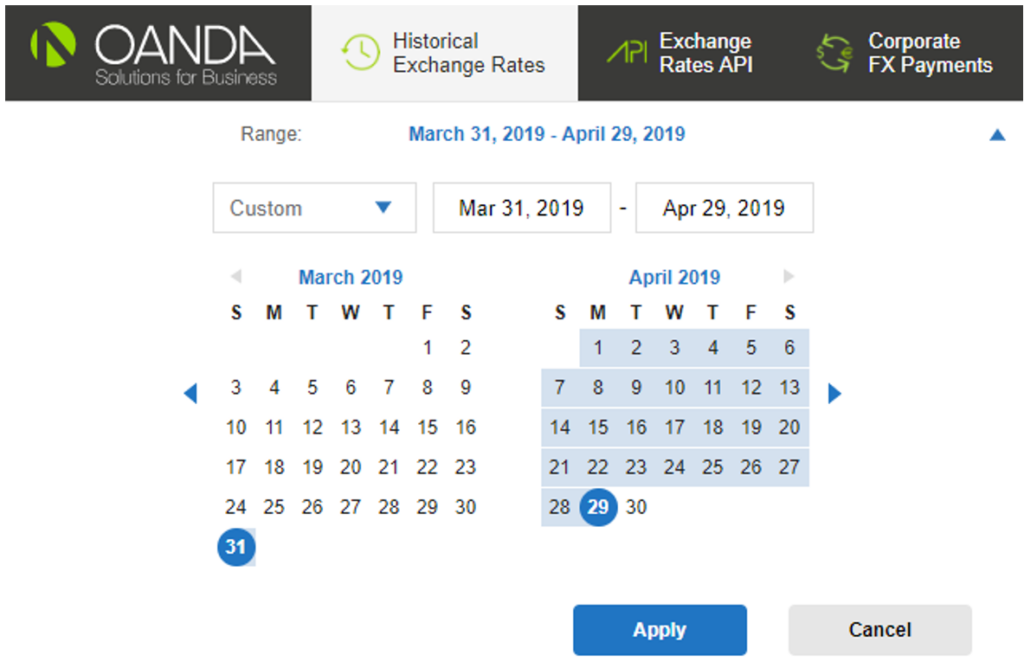
This feature can be useful for checking that the period average rates loaded in your ERP or spreadsheet match OANDA’s. However, you should ensure the date range is correct because many companies use the OANDA closing rate for one day as their Daily Rate for the following day. For example, the Period Average rates in your ERP for April may be calculated over the date range 1-Apr to 30-Apr. Note that the corresponding date range for OANDA will be 31-Mar to 29-Apr, because of the one-day lag. The correct period can be set in the ‘Range’ section at the top of the screen:
insightsoftware is a global provider of comprehensive solutions for the Office of the CFO. We believe an actionable business strategy begins and ends with accessible financial data. With solutions across financial planning and analysis (FP&A), accounting, and operations, we transform how teams operate, empowering leaders to make timely and informed decisions. With data at the heart of everything we do, insightsoftware enables automated processes, delivers trusted insights, boosts predictability, and increases productivity.